For bridal boutiques

Let every bride see herself in your dresses, on your own website.

Add one line of code and a “Wear It” button appears on your dress photos.

Three steps

How it works

  1. 01
    A laptop showing a Shopify theme editor with one line of code added to the site's header, next to a bridal boutique website marked Installed

    Add one line to your site

    Paste a single line into your website’s header.

  2. 02
    A boutique's wedding dresses page with a Wear It button on each gown photo

    A button appears on your dress photos

    We find your dress photos automatically and add a “Wear It” button to each one.

  3. 03
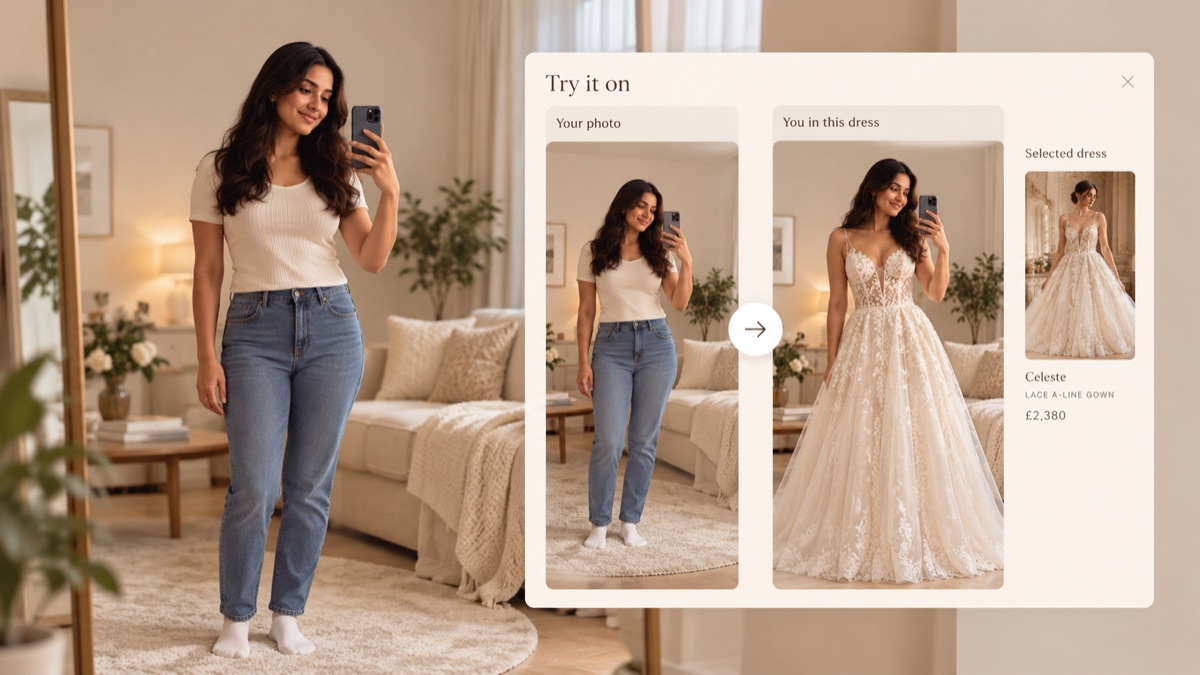
    A bride photographing herself in her living room, and a preview showing her in the lace gown she chose

    She sees herself in the gown

    She uploads a photo of herself, chooses which dress photo to try on from your collection, and virtually sees herself wearing it in 20 seconds.

How to set-up

Adding it takes a few minutes

Your own personal line of code is generated for you at the top of this page. It looks like this:

<script src="https://…/embed.js"
  data-boutique="YOUR_BOUTIQUE_ID"
  defer></script>

Your real ID appears when you generate your script. It only works on your own website.

Shopify

In your admin, open Online Store → Themes → Edit code, then layout/theme.liquid. Paste the line just before </head> and save.

WordPress & WooCommerce

Use a header-code plugin (such as “Insert Headers and Footers”) and paste the line into the header box, or add it to your theme’s header.

Wix, Squarespace and others

Look for “custom code” or “header code” in your site settings and paste the line there. Not sure? Send us your website and we’ll tell you exactly where it goes.